How to Schedule Posts
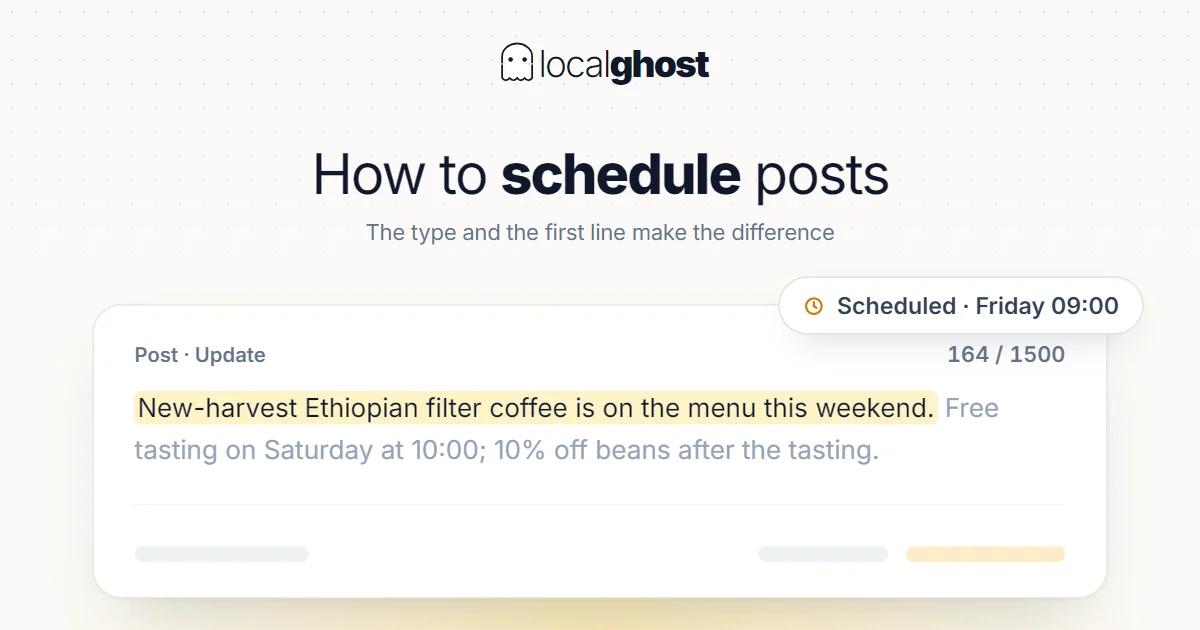
Posting is a weak ranking signal but in some sectors it brings work directly. What makes the difference is the type and the first line.
In this article
Summarize with AI
Posts are the least-used field on the profile, for two reasons: it is unclear what to write, and the return is not immediately measurable. The second reason is fair — a post is a weak ranking signal on its own. But that does not mean posting does not work; it means looking for the payoff in the wrong place.
A post does two real jobs: keeping the profile active, and delivering the piece of information that sits immediately before a buying decision. In some sectors the second one produces phone calls directly.
Post types and how long they live
A post is not one thing; there are several types and their lifetimes work differently.
Update (what's new). The general type. When a new post goes out it takes the visible slot and older ones fall back into an updates view. So a post of this type is not deleted, but its visibility is handed to the newer one. The practical consequence: without a steady flow, the space goes quiet.
Offer. The type with a start and end date. Its lifetime is set by the date range, which means the duration is in your hands. Coupon codes and terms can be attached.
Event. Also dated; once the event passes it naturally stops being current.
The practical rule that follows: if what you are describing is time-limited, use the offer or event type; if it is ongoing, use an update. Publishing a time-limited campaign as an update leaves it hanging on the profile after it ends — and a customer who sees an expired offer calls and is disappointed.
The first line is the only visible part
You have roughly 1500 characters for post text, but that is not what the reader sees: posts are truncated in preview and the part visible without a click is only the beginning.
That changes how you write completely:
- Put the subject in the first line. A post starting "Hello to our valued customers, this week we have prepared..." spends its one visible line saying nothing.
- Numbers and dates surface. First lines like "open until 6pm on Saturday" or "price per kilo updated today" do work without a click.
- Do not split the message. One idea instead of a long paragraph. A post is an announcement, not an article. Covering two subjects in one post means neither of them shows; two subjects mean two posts.
There is also a button (call to action): call, directions, order, book, learn more. A post without a button leaves the customer to work out what to do next.
Images and reasons for rejection
An image is close to mandatory: a post without one looks weak in the list. But printing text onto the image is precisely one of the rejection causes.
The most common causes of rejected posts:
- Text, price banners or watermarks laid over the image.
- A phone number written into the text. The number has its own field; putting it in the post text resembles a spam pattern.
- All capitals and excessive punctuation.
- Irrelevant or stock imagery.
- A destination link unrelated to the post.
If a post you saved is not showing, the first assumption should not be a bug but review or rejection. Rather than republishing the same text, fix the cause and submit again.
Scheduling: a rhythm you can actually sustain
"Post once a week" is common advice built on the wrong premise. The right question is: is there genuinely something that changes weekly in your sector?
If there is, the rhythm builds itself. If not, forcing a weekly post produces empty content, and an empty post says nothing to anyone.
What works:
- Pick a fixed day. The same day each week instead of a vague "now and then".
- Write ahead and schedule. Having to write the post in the moment is the most common reason it gets skipped.
- Take the source from operations. A new product, a seasonal change, a completed job, an updated price, holiday hours. Things you do not have to invent.
- Plan holidays and peak periods upfront. Holiday hours, season opening, back to school.
- Measure, but not the post alone. The effect shows up in profile data on the calls and directions side.
The sectors where posting genuinely brings work
This is the most skipped part of the posting debate: a post does not do the same job in every sector.
Trades with frequently changing prices. In scrap buying the price per kilo changes daily and that is exactly what the customer is searching for. Publishing the current price as a post answers the search directly — scrap metal and recycling.
Trades with product seasons. In wholesale food the week's arrivals, prices and stock are of direct use to a trade buyer; it is one of the rare B2B cases where posting works — wholesale food suppliers.
Trades with a daily menu. In restaurants the day's menu, offers and break hours are the most natural post content; the decision is made the same day — Google Business guide for restaurants.
Trades with a season. In accommodation, season opening, closing and period pricing — local SEO for hotels.
Trades where availability decides. In vehicle inspection the customer is mid-purchase and wants to know whether there is an appointment today; a one-line post saying "we have space this Saturday" answers the question that comes before ranking — vehicle inspection.
The common thread: a post works when it carries information that does not fit the profile's fixed fields. Category, description and hours carry the fixed information; today's price, this week's produce, Saturday's availability fit none of them. A post exists to fill exactly that gap.
The reverse is also true: in a business whose prices and services are stable all year, forcing a weekly post is low-return work. There the same effort spent on photo recency and review flow returns more — photo optimization and increasing Google reviews.
Post or photo: where should the same effort go
Posts and photos are the two most easily confused fields, because both get filed under "keeping the profile alive". They do different jobs, and if effort is limited the distinction matters.
Photos accumulate. An image you upload stays in the pool and gets looked at months later at the moment of decision. Work done once keeps working.
Posts are momentary. Their value comes from being current; a post from two months ago says nothing today. They require continuous effort.
A practical order follows: if photo coverage is incomplete (exterior, interior, result of the work, team), complete that first, because the work is done once and lasts. If coverage is complete and you genuinely have information that changes weekly, the next best investment is posts.
Doing it the other way round is the common mistake: a profile whose photo pool is three blurry images, posting weekly. Someone who sees the post opens the profile and cannot find the image they would decide on.
Posts and ranking
To be clear: publishing posts is not a lever that lifts local ranking. The three factors Google documents are relevance, distance and prominence; posts are not named in any of them. The mechanism: how the 3-pack works.
What a post does is different: it shows the profile is active and delivers information at the moment of decision. So the right expectation is not "I will rise by posting" but "someone who sees me will be more likely to call".
For the same reason, stuffing keywords into posts does not work. Used as a ranking field, post text is neither read nor safe from rejection. Do not confuse it with the category: the field that decides the pool is the category — how to choose the right category.
Frequently asked questions
How long does a post stay visible? The type decides. Offer and event posts have a date range that sets their lifetime. With updates, a new post takes the visible slot and older ones fall back — not deleted, but no longer prominent.
How many posts a week should I publish? A sustainable rhythm rather than a fixed number. If something changes weekly in your sector, weekly; if not, once a fortnight is fine. Publishing an empty post is not better than publishing none.
My post did not go live. Why? It is probably in review or rejected. The most common causes: text over the image, a phone number in the text, all capitals, an irrelevant image or link.
Will posting improve my ranking? Not as a direct lever. It keeps the profile active and provides information at the moment of decision; set the expectation accordingly.
Can I republish the same post? If the information is still valid, updating and republishing is reasonable. Repeating identical text often is neither read nor a good pattern.
Can I schedule posts in advance? Scheduling is the one thing that makes posting sustainable. What matters is not having to write in the moment; preparing holiday and seasonal posts ahead prevents most of the skipping.
Written by
Yunus Akan
Related tools: Content calendar · Grid rank tracking · Photo GPS tagging · All local SEO tools