Google Business Photo Optimization
The photo section is the most misunderstood field on the profile: coverage and recency do the work, not volume, and you do not choose the cover image.

In this article
Summarize with AI
Photos are the field owners put the most effort into and misread the most. The misreading runs two ways: on one side people believe photos pull rankings up directly, on the other they upload ten images once and never touch the section again for two years.
This guide covers what the photo surface actually does, which types you need, why you cannot choose your cover image, why photos get rejected, and what the evidence on geotagging actually shows.
What photos actually do
Photos do two separate jobs, and it helps not to confuse them.
Conversion. This is the heavy lifting. Someone who has found you and is comparing you with two competitors looks at the photos: the result of the work in a salon, the plate and the room in a restaurant, how clean the space looks in a clinic, the weighbridge in a scrap yard. That decision does not get made without photos, or it gets made against you.
An activity signal. One of the things that shows a profile is alive is the date of the newest photo. A profile whose latest image was uploaded two years ago looks abandoned to the searcher and to Google.
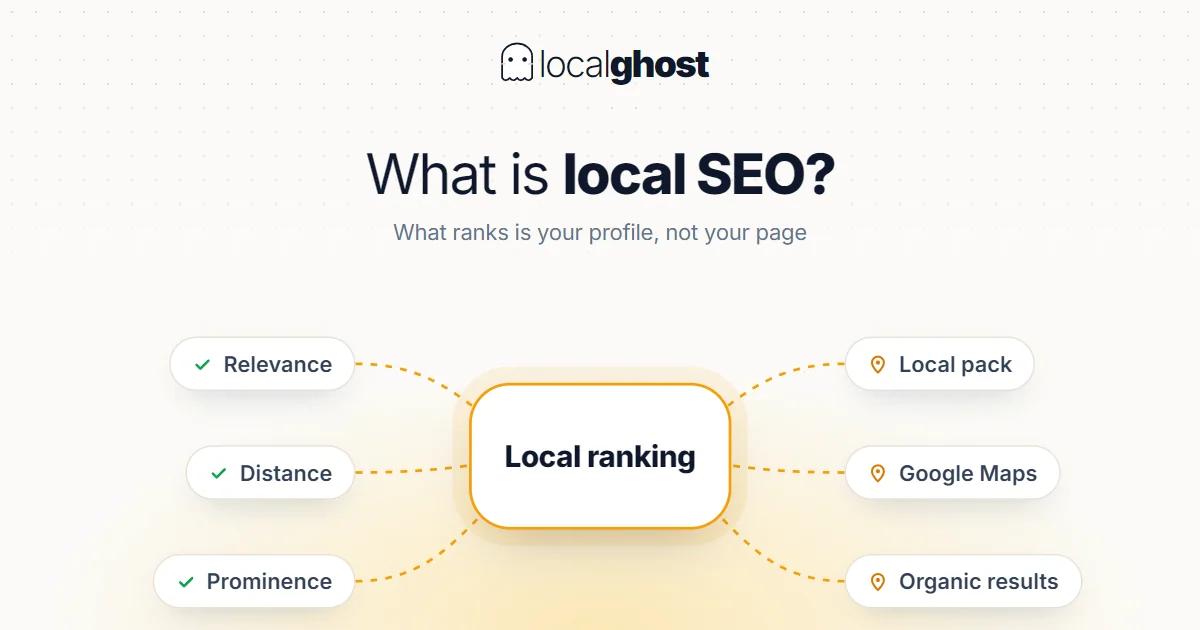
What photos do not do is act as a direct ranking lever. Google documents three factors for local ranking: relevance, distance and prominence. Photos are not named in any of the three. So expecting to climb the pack by uploading images is the wrong expectation; the real gain is that more people choose you from the same position. How the ranking side works is a separate topic: how the 3-pack works.
Google's conditions: verification, file limits, approval
There are three technical conditions, and missing any of them means the uploaded photo never appears.
Verification is required. Google's own documentation is explicit: photos and videos show up only after the Business Profile is verified. Images uploaded to an unverified profile do not go live.
File limits. The practical range for photos is roughly 10 KB to 5 MB, with no side shorter than 250 pixels. Phone photos sit comfortably inside that; the problems usually come from heavily compressed screenshots and small images generated from logos.
Approval. Every upload passes an automated review covering quality, content and suitability. So "I uploaded it but it is not showing" is usually not a bug — it is a pending or rejected upload.
Which photo types you need
Setting a coverage target works better than setting a count target. Each missing type is an unanswered question:
- Exterior and entrance. Lets the customer find the door. If several businesses share the building, this removes a reason not to turn up.
- Interior. The answer to "would I sit here". Waiting area, room, seating layout.
- The result of the work. Hair in a salon, the report and equipment in vehicle inspection, packed belongings for a mover, before-and-after in a clinic where the rules allow it — that last one depends on your jurisdiction, so check your own regulator.
- The team. A human face builds trust, especially for services that enter someone's home or premises.
- Products or menu. Images carrying price and range information convert directly.
- Parking, access, floor. Small-looking details that make turning up easier.
The one type to avoid is stock photography. An image of a place that is not yours creates an expectation mismatch on arrival, and that produces negative reviews.
Video belongs to the same surface and goes unused on most profiles. The limits are tighter than for photos: short duration, a modest file size cap and a minimum resolution. Even so, in some sectors a single video says what ten photos cannot — the real size of a space, how a procedure is done, a walk through the facility. If you have no time for video that is fine, but once photo coverage is complete this is usually the next highest-return step.
You do not choose the cover photo
This is where the common frustration sits. There is a "cover photo" setting on the profile, but it registers a preference; Google decides which image to show first and can vary that choice by surface, query and user. Customer photos are in the same pool.
The practical consequence is not to keep fiddling with the cover setting: keep the whole pool good. At best Google is choosing from your pool, and if the pool holds three blurry images the best it can pick is a blurry image. Set the cover preference once and spend the energy on pool quality.
Recency: the date of the newest photo
Total count matters up to a point; after that what matters is when the most recent upload happened. A simple rhythm is enough: once or twice a month, a photo of something that actually happened that month. A seasonal change, a new product, a refreshed space, a completed job.
This does not need to become a content project. A well-lit, real photo taken on a phone beats uploading nothing while waiting for a studio shoot.
Why photos get rejected
Behind the "I uploaded it and it vanished" complaint is usually one of these:
- The profile is unverified — the most common cause and the easiest to overlook.
- Resolution or file size outside the limits — too small, over-compressed, or above 5 MB.
- Text, logos, frames or watermarks in the image — signage is fine, but text laid over the image and promotional banners cause problems.
- Content with no clear connection to the business — unrelated scenery, screenshots, quote graphics.
- Privacy — recognisable faces shared without consent.
- Collages and heavy editing — merged images and filters that change reality.
For a rejected image, the fix is not re-uploading the same file repeatedly; it is correcting the cause and submitting a new version.
Geotagging and EXIF: what the evidence says
This is one of the most contested topics in local SEO, and the honest answer is "not settled".
What is known: geotagging means writing GPS coordinates into a photo's EXIF data. For images uploaded to Google, that metadata is widely reported to be stripped at upload. On the independent testing side the weight of evidence points to no ranking effect: a Sterling Sky test and an independent follow-up both found none, and some practitioners describe the tactic directly as a local SEO myth. Against that, a test published in 2025 reported a narrow but statistically significant effect on "near me" queries in the areas the EXIF coordinates specified.
The reasonable position in that picture: do not plan geotagging as a ranking lever. The evidence does not carry that claim. Aim instead for what taking a real photo at a real location gives you anyway — original imagery consistent with the place. On images you publish on your own website the EXIF data stays under your control, which is a separate use case.
Where to spend the effort is the more answerable question: completing coverage, keeping it fresh and clearing rejection causes are measurable; embedding coordinates is not.
Which photo decides it, by sector
The list is the same for everyone, but the type that decides the outcome varies.
In a salon the decision is made by looking at the result of the work; the portfolio is effectively the product — local SEO for hair salons. In restaurants photos do the job the menu cannot: the plate and the feel of the room, Google Business guide for restaurants.
In accommodation no room shown means no booking made; an image per room type is close to mandatory — local SEO for hotels. In healthcare the job of a photo is to reduce anxiety rather than show off: how clean and open the space looks, Google Maps SEO for dental clinics.
In scrap buying the most useful image is the weighbridge itself, because the sector's quiet objection is whether the scale is honest — scrap metal and recycling.
360-degree imagery is its own type with its own workflow: 360-degree photo guide.
Frequently asked questions
How many photos should I upload? Coverage and recency matter more than count. Once exterior, interior, team, the result of the work and products or menu are covered, the base is in place; after that it is regular additions.
Why does Google change my cover photo? The cover setting registers a preference; Google decides which image appears first and the choice can vary by surface. The fix is not the setting — it is keeping every image in the pool good.
My uploaded photo is not showing. What should I do? First check that the profile is verified — Google states photos appear only after verification. Then check file size and resolution, then whether the image carries text, a logo or a watermark.
Can I delete photos customers uploaded? You cannot directly delete images you did not upload; you can report them if they breach the rules. That is exactly why keeping your own pool strong is the only way to look good next to customer photos.
Does geotagging photos improve my ranking? The evidence does not support it: EXIF data is reported to be stripped at upload and the weight of independent testing found no ranking effect, though a 2025 test reported a narrow "near me" effect. Rather than treating geotagging as a lever, invest in coverage, recency and originality, which are measurable.
Is using stock photography a problem? It may not be rejected technically, but it hurts in practice: the arriving customer cannot reconcile what they saw with what they found, and that produces negative reviews directly.
Written by
Yunus Akan
Related tools: Add GPS to photos · Map rank tracking · SEO audit tool · All local SEO tools