Google Business Hours Optimization
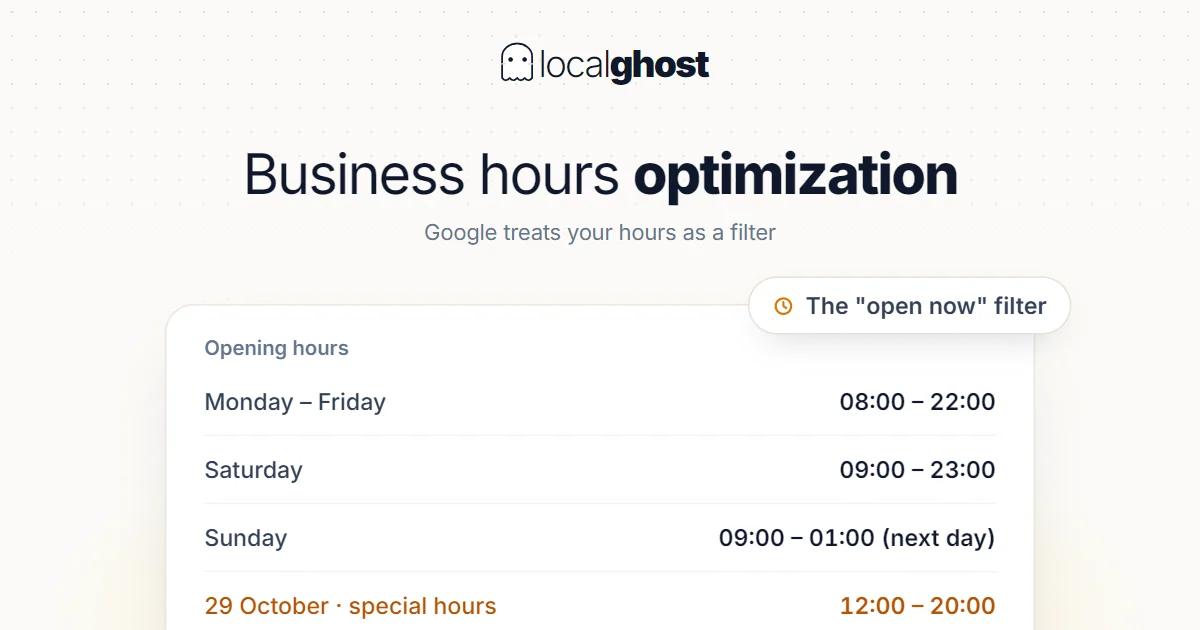
Opening hours are the one field where being wrong costs you both ranking and walk-ins, because Google treats them as a filter.
In this article
Summarize with AI
Opening hours look like the dullest field on the profile, and the most expensive mistakes happen here. The reason: hours are not an information field, they are a filter. Google separates what is open right now, and a business outside that set does not appear in the search at all, however good it is.
The second cost is more direct: wrong hours mean a customer arriving at a closed door. That customer does not come back, and often leaves a review. So this field is simultaneously a visibility, a revenue and a reputation problem.
Why hours behave like a filter
In local search the user is usually interested in "now". Google serves that in two ways: showing open or closed status inside the results, and letting the user filter to open businesses directly.
The practical consequence: if your hours are wrong, you lose in two distinct ways.
- Showing as closed while open puts you outside demand that is ready to buy right now. This is the expensive one, because what you lose is the most motivated customer.
- Showing as open while closed sends the arriving customer away. No visibility loss, but reputation loss.
That also places hours inside ranking: like the category, they are an eligibility signal. They affect getting into the set, not your score inside it. The whole mechanism: how the 3-pack works.
Regular hours: three common mistakes
Entering them once and forgetting. Hours set during profile setup sit untouched for years. The business starts closing an hour earlier; the profile stays as it was.
Treating closing time as "last customer" time. Closing is when the door closes. If your last appointment is an hour earlier, that belongs in a service description or the business description, not the hours field.
Never showing the midday break. If you close for a break, two separate ranges can be entered for a day. Not showing the break means showing as open while you are closed.
What these three share is treating hours as a setup step. In fact hours are the one profile field that changes as operations change: staffing, season, refurbishment, holidays. Which is why tying an hours check to a monthly habit pays back more than any other profile field — the others can be set correctly once and left, this one cannot.
Special hours: holidays and exceptions
Alongside regular hours there is a special hours field, and it overrides regular hours for that specific day. The right use: public holidays, new year, local events, stocktaking — one-off exceptions.
Two points matter. First, special hours can be entered in advance; entering the year's holidays in one sitting beats remembering the day before. Second, if you are closed that day, mark it "closed" rather than leaving it blank — a blank day falls back to regular hours and you show as open again.
Holiday periods are when closed-door complaints concentrate. Which makes special hours the highest-return five minutes of the year.
Ranges past midnight and 24-hour setups
There is a technical trap here. A night shift closing at 08:00 is thought of as "20:00 - 08:00", but the system treats that as a range spanning two days: start on one day, end on the next.
Entered wrongly, the result is confusing: the profile shows "closed" in the early morning, exactly when the business is working. This mistake is widespread in wholesale food, overnight logistics and on-call services — the wholesale food article treats it as the sector's biggest technical problem.
If you genuinely run without interruption there is a separate "open 24 hours" option; use it instead of filling the day in manually as 00:00-23:59. In trades that must look continuously available, such as taxi and transfer, this distinction touches demand directly: taxi and airport transfer.
One warning: showing 24 hours means actually being reachable for 24 hours. Appearing open during hours when nobody answers the phone comes straight back at you in reviews.
Extra hour types unlocked by your category
It is common to assume there is a single set of hours, but if your category qualifies, the profile unlocks additional hour types: delivery hours, pickup, drive-through, kitchen hours, reception hours.
Left empty, Google carries on with the single set and nobody notices. Filled in when available, they answer a real question: kitchen closing time is what restaurant customers ask most, and reception hours decide a late arrival in accommodation.
Because which extra hour types appear depends on your category, if you cannot find a field the place to look is not the settings but the category: how to choose the right category.
Popular times are not data you enter
Next to your hours the profile shows a "popular times" chart, and owners try to edit it. It cannot be edited: this is not a field you fill in, it is an estimate Google derives from location signals.
Two practical consequences. First, the chart looking wrong is not a settings error, so hunting for somewhere to intervene wastes time. Second, if the chart and your hours contradict each other — activity showing during hours you have marked closed — that is a hint your entered hours do not match reality. Rather than trying to fix the chart, check your own hours.
The same applies to wait time and visit duration estimates. They are derived data too, and cannot be changed through the profile.
Temporary closure: when to use it and when not
There are two distinct markers and they get confused: temporarily closed and permanently closed.
Temporarily closed is for reversible situations — refurbishment, off-season, an extended break. The profile stays up, reviews remain, and someone searching sees the status.
Permanently closed says the business has ended. Marking it by accident is a serious error; even where it can be reversed, the signal loss and user perception in between do damage.
For seasonal businesses the question is what to do in the closed season. There are two reasonable routes — mark temporarily closed, or show season hours through special hours. Which is right depends on the shape of the business: if you are unreachable out of season, the first; if you take bookings, the second. Details: SEO for seasonal businesses and local SEO for hotels.
Hour changes you did not make
A little-known reality: profile information does not change only when you edit it. Users can submit hour corrections through the "suggest an edit" flow, and Google can evaluate some signals automatically. The result can be hours that changed without you touching anything.
The practical answer is regular checking. Opening your profile once a month through a customer's eyes is the only way to notice a silent change. If you see a sudden drop in calls in the profile data, this is the first place to look — the measurement side: how to track rankings.
How much hours weigh, by sector
Hours matter everywhere, but how decisive they are varies.
In restaurants the "open now" filter is close to the defining factor; if the break between lunch and dinner service is entered wrongly, you lose at the busiest hour — Google Business guide for restaurants.
In salons hours accuracy is both a ranking and a direct revenue matter, because the client is searching for "today": local SEO for hair salons.
In vehicle inspection the question is less about hours than availability: the customer is mid-purchase and wants to know whether there is an appointment today — vehicle inspection.
Frequently asked questions
Do changing hours affect my ranking? Hours are an eligibility signal: they decide whether you enter "open now" searches. Entering correct hours is not a lever that lifts ranking, but wrong hours put you entirely outside some searches.
How should I handle a holiday? Mark the day through special hours. If you are closed, enter "closed" — a blank day falls back to regular hours and you appear open.
How do I enter hours that pass midnight? Enter the closing time as a range spilling into the next day rather than thinking of it as two separate days. If you run continuously, use the "open 24 hours" option instead of 00:00-23:59.
Does marking temporarily closed hurt? If you are genuinely closed, it is the correct choice. Appearing open while closed costs more: a customer turned away and a negative review. Reserve permanently closed for a business that has actually ended.
My hours change often. What should I do? Manage the variability in text, not in the hours field: enter the widest safe range and note that appointments or confirmation are needed in the description. An hours field that moves daily is both unmanageable and trust-eroding.
My hours changed by themselves. Is that possible? Yes. User suggestions and automatic evaluation can change profile information. Checking once a month is the practical way to catch it.
Written by
Yunus Akan
Related tools: Grid rank tracking · AI review responses · Profile analysis · All local SEO tools