Collecting Google Reviews with QR Codes: A Guide
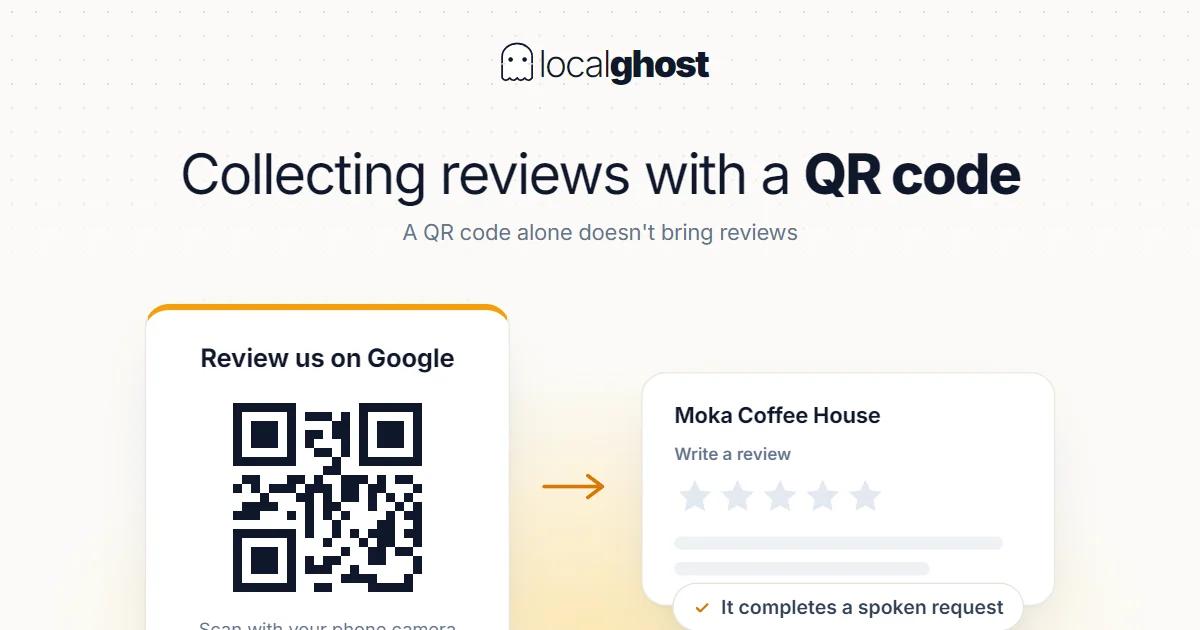
A QR code does not bring reviews on its own; it brings them when it completes a spoken request. The full setup and the prohibited line.
In this article
Summarize with AI
The biggest enemy of asking for reviews is friction. Expecting a customer to open Maps, search for your business, find the right listing and scroll to the review field means losing half of your requests. A QR code removes that friction: they hold up the camera and the review screen opens directly.
But a QR code does not work alone. Both measurement and experience show the same thing: a QR works when it completes a spoken request. A card sitting on a table that nobody mentions does not get scanned. Without the spoken ask, a QR is decoration.
Which link is the right one
The address behind the QR should be the link that opens the review form directly. A QR pointing at your profile page or your website does not remove the friction, it just moves it.
Two practical points:
Take the short link from the profile. Your profile can generate a link that goes straight to the review form. Taking it once and using the same one everywhere produces fewer errors than searching manually each time.
Consider a dynamic QR. The disadvantage of printed material is this: if the link changes, every printed card becomes waste. Using a short link whose destination can be changed later removes the risk of reprinting a thousand cards.
Where to put the QR
The right place is where the work ends and satisfaction peaks. It varies by sector:
- The till and the receipt. The most common and most effective place; payment is a natural ending.
- A table card. Standard in food and drink, but the scan rate is low without the server's spoken ask.
- The mirror and the chair back. In salons, the moment the result is seen.
- Inside the vehicle. In taxi and transfer at the end of the ride; the back of the front seat.
- The delivery document or invoice. In removals, inspection and technical services where paperwork is handed over.
- Packaging and bags. In retail and takeaway, the touchpoint that goes home.
- The exit door. A weak spot; nobody stops on the way out to scan. Not enough on its own.
There is a digital side too: the same link goes into SMS and messaging apps. The QR is for physical contact, the link for remote contact.
What to write next to it
The text beside the QR is what decides the scan rate. Three rules:
Say how long it takes. "Two lines is enough" removes the ambiguity. When the customer does not know how much work it is, they postpone.
Say what to do in one step. "Point your camera" is enough; a long explanation is not needed.
Do not steer the rating. Writing "give us 5 stars" both distorts the outcome and brushes against the guidelines. What works is asking them to describe their experience.
The prohibited line: QR makes it easy, so take care
Because a QR makes collecting reviews easier, it is also open to misuse. There are two clear prohibitions and the risk is high because a QR makes both easy.
You cannot offer incentives. A "scan the QR, get a free coffee" campaign is offering a benefit in exchange for a review, and it is prohibited. It sounds harmless but it is in scope.
You cannot gate. Pointing the QR at a screen that first asks "were you satisfied" and sending only the happy ones to the review page bends the review flow artificially and is not accepted. A QR makes this technically easy to build, which is exactly why it is the most common trap.
The distinction: showing everyone the same QR and accepting the outcome as it comes is legitimate. Choosing who leaves a review based on satisfaction is not. Detail: increasing Google reviews.
Measurement: is the QR actually being scanned
Not measuring whether the QR works is the most common gap. Tracking parameters cannot be added to the review link, so measurement is indirect:
Use a redirecting short link. Pointing the QR at a short link that reports scan counts, which then forwards to the review form, makes the scan count visible.
Watch the review flow rate. Compare weekly review counts after the QR went live with the period before.
Test placements one at a time. Putting it in three places at once makes it hard to tell which works; trying them in sequence gives a clearer answer.
General measurement on the profile side is a separate topic: reading the statistics.
Common mistakes
- Leaving it without the spoken ask. The biggest cause. A QR is an enabler, not a reminder.
- Pointing it at the wrong target. It should be the review screen directly, not the profile or the site.
- Printing it too small. A size the phone cannot read; ordering a thousand without testing.
- A static link. When the link changes, all the material becomes waste.
- Not testing. Scanning with two different phones before printing is mandatory.
- Leaving it at one point only. Where the work ends varies by sector; the exit door is the wrong point in most trades.
The best placement, by sector
In salons, in front of the mirror. The result is visible and satisfaction is at its peak — local SEO for hair salons.
In restaurants, the bill and the table card together. One sentence from the server changes the scan rate noticeably — Google Business guide for restaurants.
In inspection, at report handover. As the report is handed across; the customer has just seen the value of the service — vehicle inspection.
In removals, at the end of the job. Once the furniture is in place, with the delivery paperwork — moving company SEO.
In taxis, at the end of the ride. On the back of the front seat, with a short ask from the driver — taxi and airport transfer.
In healthcare, carefully. Rules on soliciting reviews and on promotion vary by country and professional body; this is one to ask your own regulator about — Google Maps SEO for dental clinics.
Frequently asked questions
Will a QR code increase my review count? It does, because it removes friction — but not on its own. Without the spoken ask the scan rate stays low.
Where should the QR point? To a short link that opens the review form directly. A profile page or website does not remove the friction.
Can I offer a discount for scanning? No. Offering a benefit in exchange for a review is prohibited, and running the campaign through a QR is still in scope.
Can I ask about satisfaction first and then route them? No, that is gating and it is not accepted. Everyone has to get the same link and the outcome accepted as it comes.
How do I measure scans? Tracking parameters cannot be added to the review link; putting a short link that reports scan counts in between is the most practical route.
What should I test before printing? Scan it with two different phones, confirm the right screen opens, and check the print size is readable. Whether the link can be changed later is also a pre-print decision.
Written by
Yunus Akan
Related tools: Review replies · SEO audit tool · Map rank tracking · All local SEO tools