Google Business API Automation
You cannot simply enable the Google Business Profile API and start using it. The access model, the federated structure, and automation's real limits.
In this article
Summarize with AI
The first thing to learn here is administrative rather than technical: the Google Business Profile APIs are not open to the public.
Google's own documentation says it plainly: you have to request access to use the APIs, and individuals or companies who can demonstrate a legal business reason are approved. The APIs are also described as designed for developers representing large, tech-savvy businesses and third parties.
So enabling the API in Cloud Console and starting work is not possible. This is exactly where developers lose the most time.
What a quota of 0 means
This is the most confusing symptom of the access model, and misdiagnosing it costs weeks.
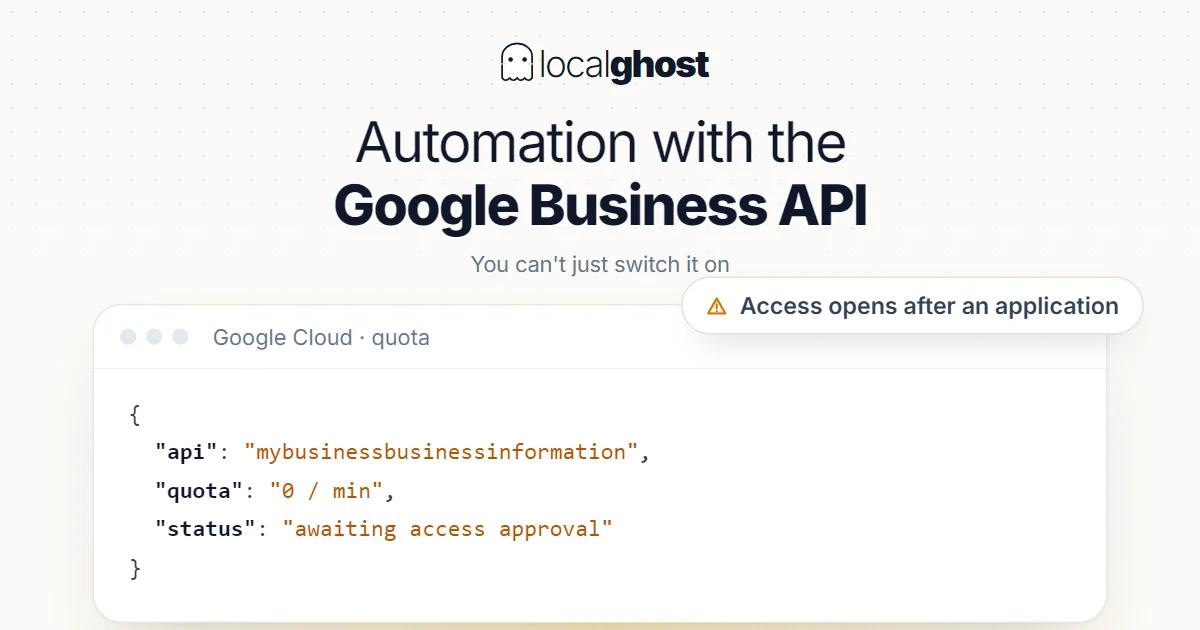
If your quota limit shows 0 after enabling the API, this is not a quota problem: it means access has not been granted yet. Google's documentation also states what not to do in that situation — do not request a quota increase. What you need to do is submit the basic API access request.
The distinction matters because there are two separate processes: access (can you use the API at all) and quota (how much can you use). Requesting a quota increase without access means queueing in the wrong line.
Once access is granted, quota limits come into play. Google enforces request quotas for fair usage and system stability; a request exceeding the limit returns 429 Too Many Requests over HTTP and RESOURCE_EXHAUSTED over gRPC. Quota increases can be requested at that stage, justified by usage.
One rule is explicit: fake or test listings are not permitted in production environments. Creating a non-existent business to experiment with puts your access at risk.
Federated structure: not one API but a family of endpoints
The architectural expectation needs correcting up front. "The Google Business Profile API" is not a single interface.
Per Google's documentation the APIs use a federated model: separate endpoints for different functionality, and each endpoint has a different base URL. Posts and Reviews are given as examples.
That has practical consequences:
One client configuration is not enough. Each endpoint needs the correct base URL and version.
Authorization scopes need thinking through separately. Which permission a given operation requires varies by endpoint.
Reading the documentation from one place misleads. A field name valid on one endpoint may not exist on another.
Functionally the scope is broad: managing account and location information, controlling how data is presented across Google, determining who co-manages that data, and managing user-created data such as photos, posts and reviews. Google notes the APIs offer almost the same features as the user interface, plus some that are API-specific.
What changed from v4
For anyone migrating an older codebase this is the critical heading.
Many features previously available in v4 of the Google My Business API are now deprecated, with users directed to the Account Management and Notifications APIs.
Which means the v4 examples you find online most likely do not work. Copying a request body from an old blog post is a day spent debugging.
The right behaviour is treating the reference documentation as the primary source and confirming there which functionality moved to which API. This is a general principle that also applies on the schema side: surfaces change, so check the docs: schema markup setup.
OAuth and access management
An application working through the API reaches a business's data on the user's behalf. Both sides of that relationship need to be manageable.
On the user side: the Google Account displays which apps have access and what data each can reach. The user can remove that access at any time.
The practical consequence for a business owner matters: if you work with an agency or a piece of software and then part ways, removing that app's access from your own account is in your hands. This connects to why access structure needs writing down in franchise and agency relationships: local SEO management for franchises.
On the developer side, you should work assuming access can be revoked: when a token becomes invalid the application must not fail silently, it has to surface the error.
Where automation genuinely helps
Setting up the API is a cost, so what you get back should be clear. Without scale that cost is not covered.
Bulk information updates. Changing hours, a phone number or a service across dozens of branches by hand takes days. This is where the real gain sits: multi-location management.
Collecting reviews in one place. Seeing every branch's reviews in one dashboard is the fastest way to find the ones going unanswered. The problem of a chain average hiding the weak branch gets solved here: review response templates.
Accumulating performance data. The profile interface shows limited history. Pulling data regularly and storing it your side makes questions like seasonality answerable: reading the statistics.
Shortening response time with notifications. Wiring new-review or change notifications into your own system lowers reply time markedly compared with manual checking.
Verification and consistency checks. Programmatically auditing category, name format and hour consistency across branches is work that cannot be done by hand: NAP consistency.
Where automation does not help
Honesty is needed here, because the API does some jobs worse.
Writing review replies. An automatically generated reply reads like a template, and template replies do not build trust. The correct use of the API is not writing the reply but finding the unanswered one.
Producing posts. A post generated by a program when there is nothing to say is empty content: how to schedule posts.
Affecting rankings. The API is not a ranking tool; it performs programmatically what can be done through the interface. Building automation does not bring visibility, it scales maintenance.
Maintenance at small scale. For a single-location business the cost of setting up the API exceeds the time it saves. At that scale the right tool is a calendar: weekly maintenance calendar.
Preparing before you apply
Given that the access request asks for a legal business reason, preparation matters more than the submission itself.
Write concretely what you will do. Not "manage profiles"; which data, how often, for what purpose.
Clarify who you act for. Your own business or your clients? If you operate as a third party, that relationship should be defined.
Work with real listings. Creating fake businesses for testing is not permitted in production.
Separate access from quota. If you see a quota of 0, submit the access request, not a quota increase.
Be realistic about timing: this is an approval process and your project plan needs slack for it. If something has to be ready for an opening, start early: 30-day plan for a new business.
Frequently asked questions
Can anyone use the Google Business Profile API? No. Per Google's documentation the APIs are not open to the public; access must be requested and those demonstrating a legal business reason are approved.
My quota limit is 0. What should I do? Do not request a quota increase. A quota of 0 indicates access has not been granted; you need to submit the basic API access request.
What happens when I exceed quota? The request returns 429 Too Many Requests over HTTP and RESOURCE_EXHAUSTED over gRPC. After access is granted, increases can be requested with a usage justification.
Is there a single API? No. The APIs use a federated model: separate endpoints for different functionality, each with its own base URL.
Can I use v4 examples? Most likely not. Many v4 features are deprecated and users are directed to the Account Management and Notifications APIs.
Will setting up the API improve my rankings? No. The API performs programmatically what the interface already allows; the gain is maintenance speed at scale, not visibility.
Written by
Yunus Akan
Related tools: Review replies · All local SEO tools